On the Google Webmaster blog ...
The webmaster central team is very excited about our plans for this year ... googlewebmastercentral.blogspot.com
The basic principal is the same, that is to tell each search engine of all pages in your site. Google uses an XML sitemap to specify what pages are available, whereas Yahoo uses a text site list. You specify a sitemap for each web site you manage. I currently managing 17 sites in both Google Webmaster and Yahoo Site Explorer.
Authentication
Before you can use Google WEBmaster Tools and Yahoo SiteExplorer you must have a Google account and a Yahoo account. Both tools require you to authenticate or prove that you are an administrator / owner of the sites you are trying to manage. Google provides two options for authentication
- upload an HTML file with a name they specify
- add a META tag to your site's index file
Be aware that if you have custom 404 Error handling you can only use meta tag option. Yahoo requires you to upload a file they specify to the root folder of the site.
Features
Google:
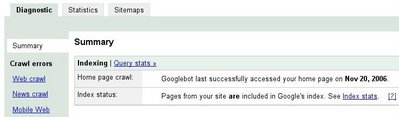
- Diagnostics - time of last crawl and any errors found
- Statistics - on the last crawl and some of the keywords used to find your site
- Sitemaps - submit and report errors or last access
The diagnostic section also enables you to specify preferred domain, crawl rate of their robot and enhanced image search. Some sites do not get the option to modify all settings.
Yahoo:
There are fewer features available in Site Explorer but IMHO it looks better. Their use of AJAX is much cleaner. You can submit a site feed and explore a site. This gives you a good overview of:
- Pages indexed in Yahoo including date last crawled
- Inbound links to your site
- Subdomains

Summary
Overall, Googles Webmaster Tool provides more features required for any webmaster or specialist endeavouring to get more content indexed. The Yahoo tool is still in BETA so hopefully there are more features to come.
The use of these tools do not remove the need for page optimisation, they merely provide another tool in the arsenal to manage content in Google and Yahoo.

